Using Email Directories in Thunderbird or Outlook
The SSCC and the University of Wisconsin-Madison campus have directories with the names and email addresses of SSCC members and everyone on campus respectively. The SSCC directory always lists the SSCC email address of SSCC members, but those who do not use their SSCC email accounts normally have them forwarded to the address they do use.
Thunderbird and Outlook can communicate with these directories using LDAP (Lightweight Directory Access Protocol). Once your email program is configured to connect to one or both of these directories, you can look up names, email addresses, and phone numbers, or even have the program try to automatically complete addresses based on information from a directory.
Thunderbird
The following instructions will show you how to connect to both the SSCC directory and the campus directory using Thunderbird.
Configuring Directories
Start Thunderbird, open the Address Book, and click File, New, LDAP Directory. This will give you a window where you can enter the information about the directory you want to connect to.
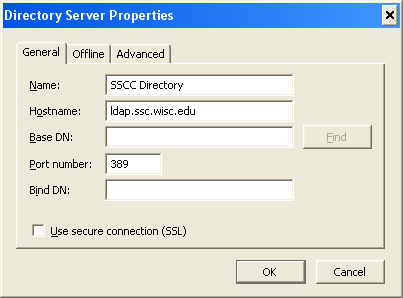
The SSCC LDAP Directory
Set Name to SSCC Directory (or anything you prefer--this is for your use) and Hostname to ldap.ssc.wisc.edu. The other boxes can be left as is, so click OK and the directory is ready for use.
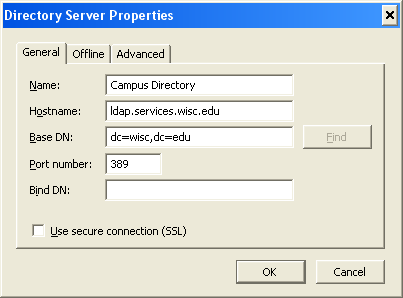
The Campus LDAP Directory
Set Name to Campus Directory (or whatever you prefer), Hostname to ldap.services.wisc.edu, and Base DN to dc=wisc,dc=edu. Then click OK and it's ready for use.
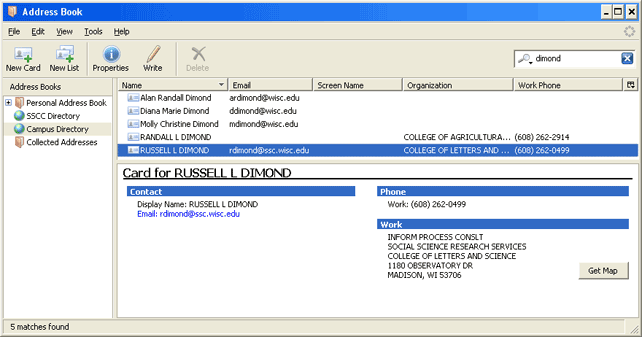
Looking Someone Up in a Directory
To look someone up in a directory, open the Address Book and select the directory you want to look in on the left. Type the name of the person you wish to find in the box in the upper right, press Enter, and you'll get a list of people who match the information you typed. You can then select a person to get details about them.
Autocomplete with Directories
When you start typing an address for a new message, Thunderbird by default looks in your address book to see what entries match what you've typed thus far. You can have it also check LDAP directories. The advantage is easy access to lots of addresses; the disadvantage is that you will have a lot more matches to consider. Also, if you click on the wrong address your message will most likely go to a total stranger rather than another person in your address book. Thus we suggest you think carefully before you turn on this feature--especially with the campus directory.
If you do want Thunderbird to look at an LDAP directory when completing addresses, click Tools, Options, and then the Composition tab. Under Address Autocompletion, check Directory Server, and then choose either SSCC Directory or Campus Directory.
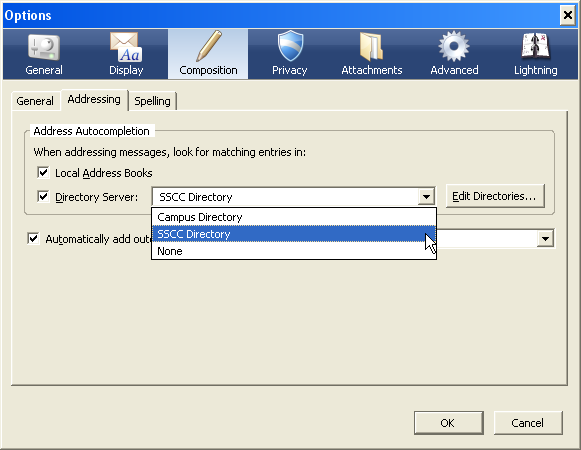
To turn this feature off, simply uncheck the Directory Server box.
Outlook
DoIT has directions for configuring Outlook to read the campus directory in their KnowledgeBase. You can use the same directions to read the SSCC directory with the following changes:
- Replace ldap.services.wisc.edu with ldap.ssc.wisc.edu
- Leave the Search Base set to Use Default
Completing the process requires restarting Outlook and then doing a few more things (steps 15-18 in the instructions). Don't forget these steps or the new directory will not be active.
Last Revised: 7/9/2014

 RSS |
RSS |