Stat/Transfer is a utility program that converts data sets from one format to another (for example SPSS to Stata, or Excel to SAS). It is quick and easy to use, and available on Winstat, Linstat and in the SSCC computer labs.
Using Stat/Transfer's Graphical User Interface
If you start Stat/Transfer on Winstat, in the lab or by typing stattransfer on Linstat you'll see the following:
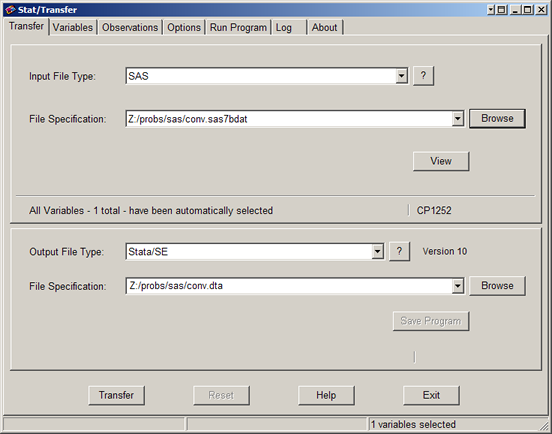
Set the Input File Type to the kind of file you have, then click Browse to identify the particular file you want to convert. Set the Output File Type to the kind of file you want. Then click Transfer and Stat/Transfer will convert the file for you.
The file types are mostly self-explanatory. To create an SPSS file set the Output File Type to SPSS Unicode for Windows. In general ASCII/Text - Delimited can only be used to convert text files if they are very structured.
The other tabs are typically not needed. Variables lets you choose which variables are converted, and set their types. Observations lets you convert just a subset of your data. Options has a wide variety of settings for converting various kinds of files. For example, by default Stat/Transfer will stop reading an Excel file if it encounters a blank line (on the assumption that anything after that will be notes or other material other than data) but you can change that behavior by clicking the Options tab and then Worksheets.
Using Stat/Transfer from the Command Line
On Linstat you can use Stat/Transfer to convert a file very quickly and easily from the command line using st rather than stattransfer:
st inputfile outputfile
Stat/Transfer will determine the file types by their extensions. For example:
st file.sas7bdat file.dta
will convert file from SAS format to Stata format.
The same principle applies in Windows. To get a command line, click the Windows Logo button (Start in older versions of Windows) and then in the Search (Run) box type cmd. In Windows you also have to give the location of the program, and it's best to put file names in quotes (sometimes they're not needed, but often they are). Thus the command becomes:
"c:\program files (x86)\stattransfer10\st.exe" "inputfile" "outputfile"
(The location of st.exe may vary. The above is its location on Winstat.)
The command to run Stat/Transfer can be included in many statistical programs. The following Stata code will save the data set in memory as outputdata.dta, then convert it to Excel format:
save outputdata, replace
! st outputdata.dta outputdata.xls -y
The exclamation point (!) indicates that the following command is to be executed by the computer's operating system rather than Stata. The SAS equivalent is x. The -y switch tell Stat/Transfer that yes, it is allowed to overwrite any existing version of output.xls. It plays the same role as the replace option in Stata's save command. Note that this code was written to run on Linstat. The Windows version would be:
save outputdata, replace
! "c:\program files (x86)\stattransfer11\st.exe" "outputdata.dta" "outputdata.xls" -y
For more complicated tasks you can create Stat/Transfer command files. For more details on command files and Stat/Transfer in general, see the documentation. On Linstat, make sure you're on Linstat1 and type:
acroread /software/stattransfer/Help/manual.pdf
On Winstat, click the Windows Logo button, All Programs, StatTransfer 10, StatTransfer 10 PDF Manual.
Last Revised: 7/12/2011